mirror of
https://github.com/sourcegraph/sourcegraph.git
synced 2026-02-06 18:51:59 +00:00
 f77f0272cf
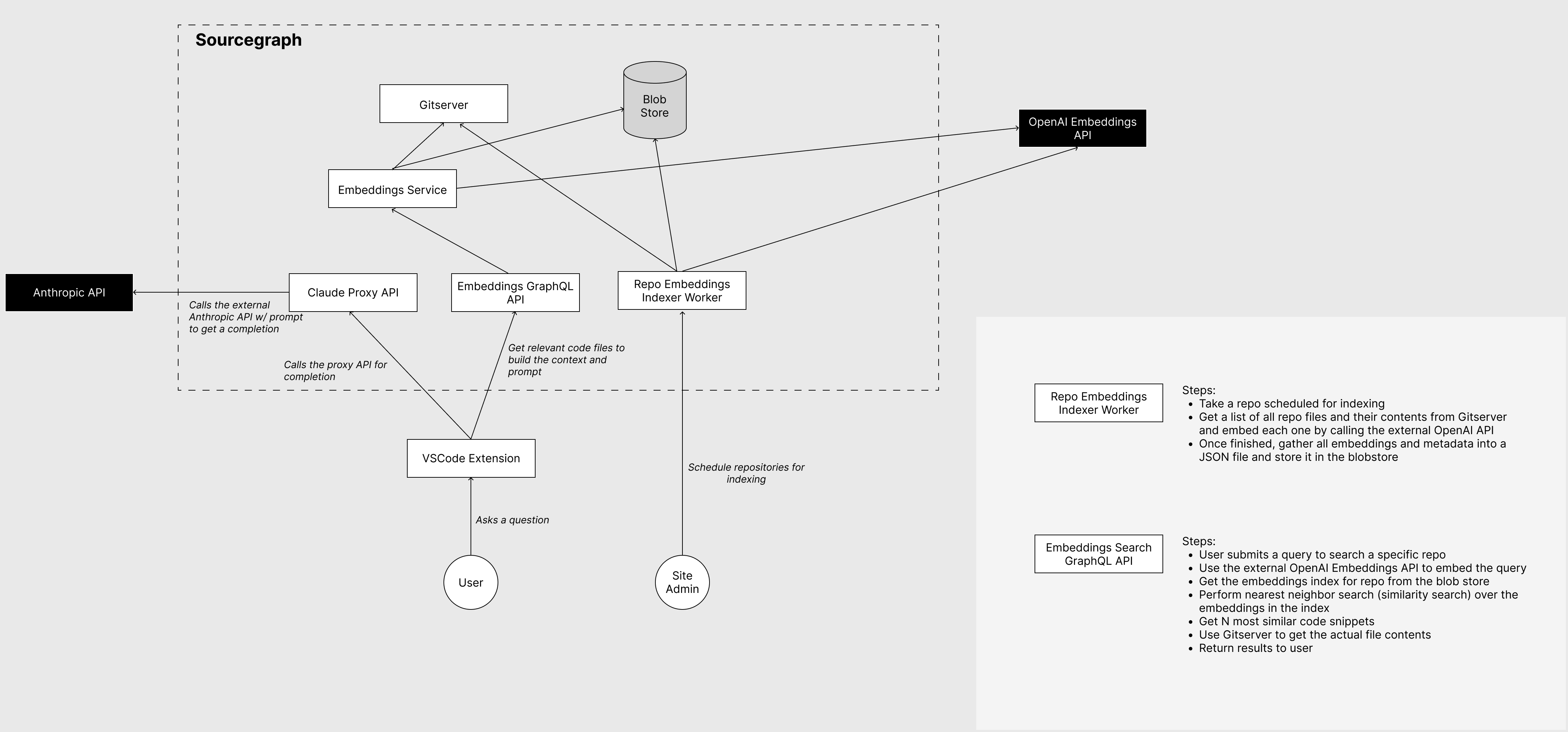
# High-level architecture overview
<img width="2231" alt="Screenshot 2023-02-24 at 15 13 59"
src="https://user-images.githubusercontent.com/6417322/221200130-53c1ff25-4c47-4532-885f-5c4f9dadb05e.png">


# Embeddings

Really quickly: embeddings are a semantic representation of text.
Embeddings are usually floating-point vectors with 256+ elements. The
neat thing about embeddings is that they allow us to search over textual
information using a semantic correlation between the query and the text,
not just syntactic (matching keywords).

In this PR, we implemented an embedding service that will allow us to do
semantic code search over repositories in Sourcegraph. So, for example,
you'll be able to ask, "how do access tokens work in Sourcegraph", and
it will give you a list of the closest matching code files.

Additionally, we build a context detection service powered by
embeddings. In chat applications, it is important to know whether the
user's message requires additional context. We have to differentiate
between two cases: the user asks a general question about the codebase,
or the user references something in the existing conversation. In the
latter case, including the context would ruin the flow of the
conversation, and the chatbot would most likely return a confusing
answer. We determine whether a query _does not_ require additional
context using two approaches:

1. We check if the query contains well-known phrases that would indicate
the user is referencing the existing conversation (e.g., translate
previous, change that)
1. We have a static dataset of messages that require context and a
dataset of messages that do not. We embed both datasets, and then, using
embedding similarity, we can check which set is more similar to the
query.

## GraphQL API

We add four new resolvers to the GraphQL API:

```graphql
extend type Query {
  embeddingsSearch(repo: ID!, query: String!, codeResultsCount: Int!, textResultsCount: Int!): EmbeddingsSearchResults!
  isContextRequiredForQuery(query: String!): Boolean!
}
extend type Mutation {
  scheduleRepositoriesForEmbedding(repoNames: [String!]!): EmptyResponse!
  scheduleContextDetectionForEmbedding: EmptyResponse!
}
```

- `embeddingsSearch` performs embeddings search over the repo embeddings
and returns the specified number of results
- `isContextRequiredForQuery` determines whether the given query
requires additional context
- `scheduleRepositoriesForEmbedding` schedules a repo embedding
background job
- `scheduleContextDetectionForEmbedding` schedules a context detection
embedding background job that embeds a static dataset of messages.

## Repo embedding background job

Embedding a repository is implemented as a background job. The
background job handler receives the repository and the revision, which
should be embedded. Handler then gathers a list of files from the
gitserver and excludes files >1MB in size. The list of files is split
into code and text files (.md, .txt), and we build a separate embedding
index for both. We split them because in a combined index, the text
files always tended to feature as top results and didn't leave any room
for code files. Once we have the list of files, the procedure is as
follows:

- For each file
  - Get file contents from gitserver
- Check if the file is embeddable (is not autogenerated, is large
enough, does not have long lines)
  - Split the file into embeddable chunks
- Embed the file chunks using an external embedding service (defined in
site config)
  - Add embedded file chunks and metadata to the index
- Metadata contains the file name, the start line, and the end line of
the chunk
- Once all files are processed, the index is marshaled into JSON and
stored in Cloud storage (GCS, S3)

### Site config changes

As mentioned, we use a configurable external embedding API that does the
actual text -> vector embedding part. Ideally, this allows us to swap
embedding providers in the future.

```json
"embeddings": {
  "description": "Configuration for embeddings service.",
  "type": "object",
  "required": ["enabled", "dimensions", "model", "accessToken", "url"],
  "properties": {
    "enabled": {
      "description": "Toggles whether embedding service is enabled.",
      "type": "boolean",
      "default": false
    },
    "dimensions": {
      "description": "The dimensionality of the embedding vectors.",
      "type": "integer",
      "minimum": 0
    },
    "model": {
      "description": "The model used for embedding.",
      "type": "string"
    },
    "accessToken": {
      "description": "The access token used to authenticate with the external embedding API service.",
      "type": "string"
    },
    "url": {
      "description": "The url to the external embedding API service.",
      "type": "string",
      "format": "uri"
    }
  }
}
```

## Repo embeddings search

The repo embeddings search is implemented in its own service. When a
user queries a repo using embeddings search, the following happens:

- Download the repo embedding index from blob storage and cache it in
memory
  - We cache up to 5 embedding indexes in memory
- Embed the query and use the embedded query vector to find similar code
and text file metadata in the embedding index
- Query gitserver for the actual file contents
- Return the results

## Interesting files

- [Similarity
search](https://github.com/sourcegraph/sourcegraph/pull/48017/files#diff-102cc83520004eb0e2795e49bc435c5142ca555189b1db3a52bbf1ffb82fa3c6)
- [Repo embedding job
handler](https://github.com/sourcegraph/sourcegraph/pull/48017/files#diff-c345f373f426398beb4b9cd5852ba862a2718687882db2a8b2d9c7fbb5f1dc52)
- [External embedding api
client](https://github.com/sourcegraph/sourcegraph/pull/48017/files#diff-ad1e7956f518e4bcaee17dd9e7ac04a5e090c00d970fcd273919e887e1d2cf8f)
- [Embedding a
repo](https://github.com/sourcegraph/sourcegraph/pull/48017/files#diff-1f35118727128095b7816791b6f0a2e0e060cddee43d25102859b8159465585c)
- [Embeddings searcher
service](https://github.com/sourcegraph/sourcegraph/pull/48017/files#diff-5b20f3e7ef87041daeeaef98b58ebf7388519cedcdfc359dc5e6d4e0b021472e)
- [Embeddings
search](https://github.com/sourcegraph/sourcegraph/pull/48017/files#diff-79f95b9cc3f1ef39c1a0b88015bd9cd6c19c30a8d4c147409f1b8e8cd9462ea1)
- [Repo embedding index cache
management](https://github.com/sourcegraph/sourcegraph/pull/48017/files#diff-8a41f7dec31054889dbf86e97c52223d5636b4d408c6b375bcfc09160a8b70f8)
- [GraphQL
resolvers](https://github.com/sourcegraph/sourcegraph/pull/48017/files#diff-9b30a0b5efcb63e2f4611b99ab137fbe09629a769a4f30d10a1b2da41a01d21f)


## Test plan

- Start by filling out the `embeddings` object in the site config (let
me know if you need an API key)
- Start the embeddings service using `sg start embeddings`
- Go to the `/api/console` page and schedule a repo embedding job and a
context detection embedding job:

```graphql
mutation {
  scheduleRepositoriesForEmbedding(repoNames: ["github.com/sourcegraph/handbook"]) {
    __typename
  }
  scheduleContextDetectionForEmbedding {
    __typename
  }
}
```

- Once both are finished, you should be able to query the repo embedding
index, and determine whether context is need for a given query:

```graphql
query {
  isContextRequiredForQuery(query: "how do access tokens work")
  embeddingsSearch(
    repo: "UmVwb3NpdG9yeToy", # github.com/sourcegraph/handbook GQL ID
    query: "how do access tokens work",
    codeResultsCount: 5,
    textResultsCount: 5) {
    codeResults {
      fileName
      content
    }
    textResults {
      fileName
      content
    }
  }
}
```
19 lines
548 B
Go
19 lines
548 B
Go
package binary
|
|
|
|
import (
|
|
"net/http"
|
|
"strings"
|
|
"unicode/utf8"
|
|
)
|
|
|
|
// IsBinary is a helper to tell if the content of a file is binary or not.
|
|
func IsBinary(content []byte) bool {
|
|
// We first check if the file is valid UTF8, since we always consider that
|
|
// to be non-binary.
|
|
//
|
|
// Secondly, if the file is not valid UTF8, we check if the detected HTTP
|
|
// content type is text, which covers a whole slew of other non-UTF8 text
|
|
// encodings for us.
|
|
return !utf8.Valid(content) && !strings.HasPrefix(http.DetectContentType(content), "text/")
|
|
}
|